 Minglea
Discover
Interest rails for Music, Travel, Cooking, Fitness and the topics you pick, with who's live right now and the latest moments from people who share them.
Minglea is a social app for adults that starts with your interests. Explore moments and live sessions around music, travel, food, fitness and more, drop into a livestream or a room, and match for a one-to-one conversation with someone who shares what you love.
Free to download · iPhone and Android · For adults 18+
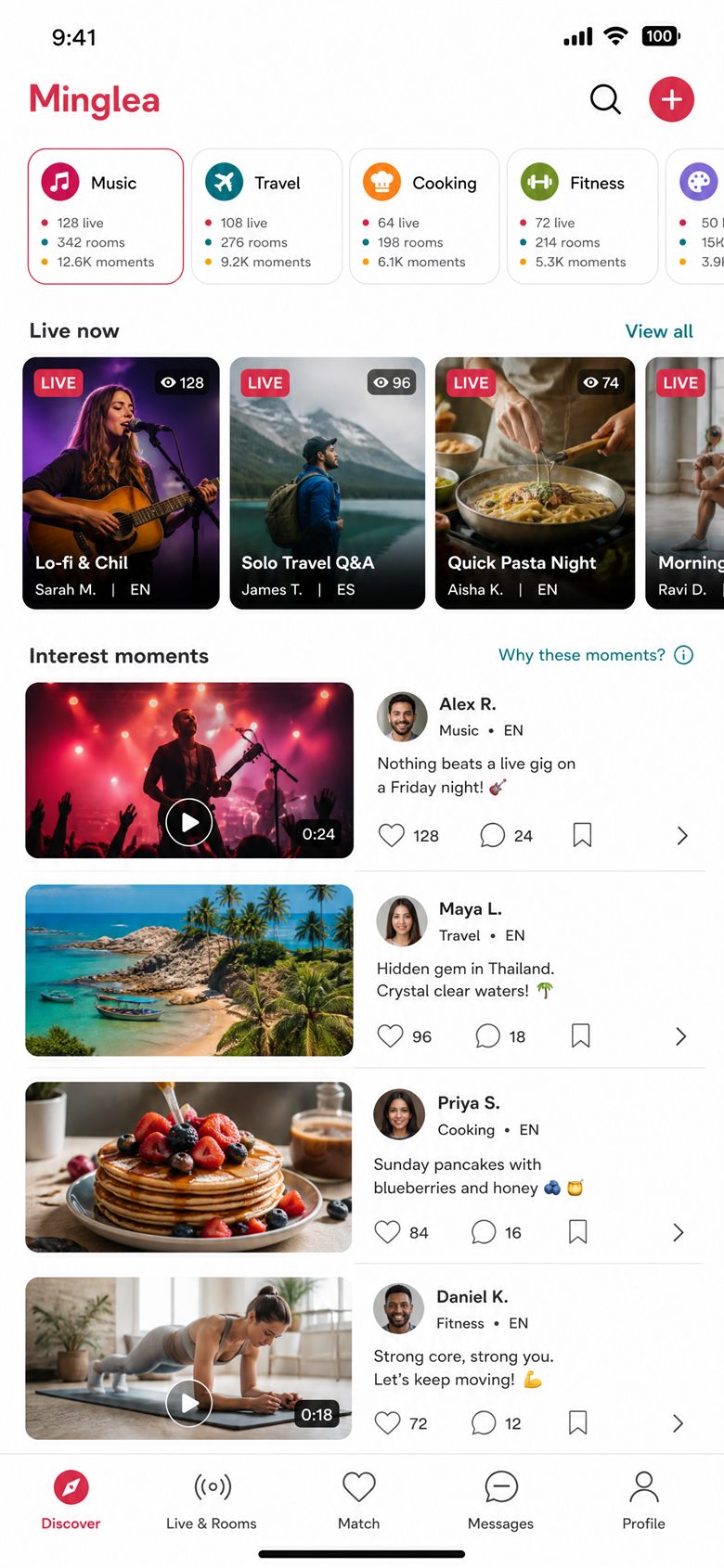
Discovery and matching start from the interests and languages you choose — never your location, your contacts or a popularity score.
Interest rails for Music, Travel, Cooking, Fitness and the topics you pick, with who's live right now and the latest moments from people who share them.
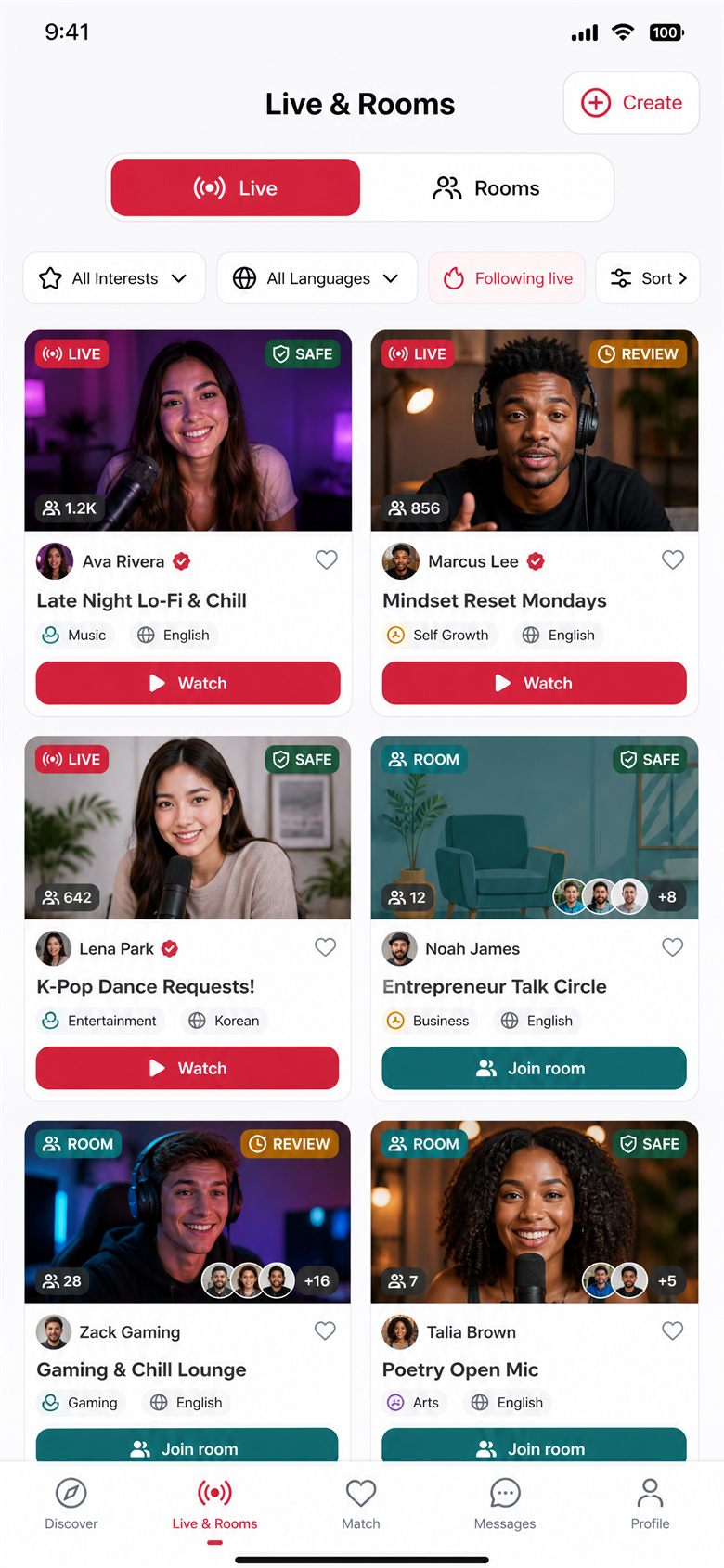
Watch a moderated creator livestream, or join an audio or video room. Every card shows the topic, language, host and safety state before you go in.
Get matched with another adult for a text-and-photo conversation, based only on shared interests and a language you both speak. You both accept before the chat opens.
Your matches and chats, safety updates and your support requests, together in one inbox.
Share a text, up to five photos or a short video, tagged with an interest. Everything is checked before it's published.
No follower leaderboards, popularity levels or creator tiers. Gifts are a thank-you on a livestream — never a rank.
Everything is a tap away, and every privacy and safety control lives in Profile → Settings.
Coins are optional, bought once, and only ever spent on virtual gifts inside Minglea.
Coins are one-time purchases through the Apple App Store or Google Play. There is no subscription and no recurring billing, and you see the final price before you pay.
A gift never becomes creator revenue, a level, a privilege, a leaderboard place or a withdrawal right. Before you send one you see its cost, your balance and who receives it.
Coins and gifts can't be exchanged for money, moved between accounts or withdrawn. Unused coins are lost if you delete your account.
Reporting, blocking and your privacy choices sit right where you need them.
Moments, comments, profile edits and session titles are checked before anyone sees them. Photos and videos wait for review, and sensitive media stays blurred until you choose to see it.
Report a person, creator, livestream, room, message, moment or comment from its menu and get a case ID straight away. Blocking hides their content and stops all contact.
If we act on your content or account, you get a statement of reasons and 14 days to appeal. Appeals are reviewed by a person, not only the original automated check.
The camera and microphone are requested only when you go live, take a stage seat or capture a photo, with a plain explanation first. Photos come from the system picker.
Privacy Center lets you access, export, correct, restrict or delete your data, and switch optional analytics and personalization on or off at any time.
Minglea is 18+. Under-18 sign-ups are blocked, and accounts with credible signals of being under 18 are paused until they're re-verified.
Free to download. Pick your interests and languages, confirm you're 18+, and the people who share them are already there.
Yes. Creating an account, discovering, matching, messaging and watching are free. The only purchase is optional coins for virtual gifts, bought once through the App Store or Google Play — there are no subscriptions.
Matching uses only your chosen interests and conversation languages — never your location, your contacts or a popularity score. You both accept before the chat opens, and you can pause matching any time in Match → Preferences.
No. They're only requested when you go live, speak from a stage seat, or capture a photo or video. Without them you can still browse, match, message, watch and listen.
The interface is available in English and 中文 (简体). For matching you can choose from 28 conversation languages. Change either in Profile → Settings → Language.
Text is checked as you post; photos and videos are held for review before they're published. The outcome shows on the moment in Profile → My moments, and you can appeal a rejection from there.
In the app: Profile → Settings → Account and access → Delete account, then type DELETE to confirm. You have 7 days to change your mind; after that your data is deleted or irreversibly anonymized, apart from the narrow records the law requires us to keep. Unused coins are lost. Step-by-step guide.
Coins and gifts have no cash value and can't be withdrawn. Purchases are processed by Apple or Google, so refunds follow their rules — Help & Support → Refund requests in the app can point you to the right place.
Open the menu on their profile, message, moment or session and choose Report, then Block. If anyone is in immediate danger, call your local emergency number first. Profile → Settings → Reports and appeals shows the status of every case.